On May 8th, Xiaomi (01810.HK) stock price surged against the market trend by 6.5%, reaching a closing price of 19.1 yuan, hitting a new high in over two years. On May 10th, the closing price was reported at 19.4 yuan, with a market capitalization reaching 484.3 billion Hong Kong dollars.
Over the past three months, Xiaomi's stock price has continued to rise, with a cumulative increase of 22% year-to-date, outperforming the Hang Seng Tech Index. Several brokerage firms are optimistic about Xiaomi's first-quarter performance this year, expecting it to likely exceed market expectations. At the same time, it is expected that the delivery volume of Xiaomi's electric car SU7 will exceed ten thousand units in June, coupled with the upcoming release of Xiaomi's foldable phone new product in the second half of this year. These positive factors are expected to continue to support Xiaomi's stock price. The chart below shows Xiaomi's stock price trend over the past three months.
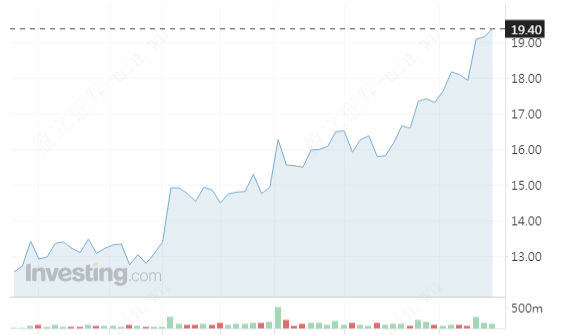 (Source:Investng.com,2024.05.11)
Stock price keeps rising, hitting new highs for the year
Following the successful launch of Xiaomi's first electric car, the SU7, on March 28th, sales exceeded expectations, driving the stock price higher. Several Xiaomi car reservation customers have expressed on social media that the delivery time for the SU7 MAX version has been advanced by nearly 7 weeks. The rise in Xiaomi Group's stock price is mainly attributed to positive market expectations for the company's first-quarter performance.
On March 28th, Xiaomi Group held the XIAOMI SU7 listing presentation. On the following trading day, April 2nd, Xiaomi Group's opening stock price surged by 16%, although it settled to a 9% increase by the close. Subsequently, Xiaomi's stock price continued to fluctuate upwards, with a nearly 30% increase since March 28th, reaching new highs for the year. On May 8th, Xiaomi Group's stock price surged against the market trend, closing up 6.47% at 19.1 Hong Kong dollars per share, with a market value of 476.6 billion Hong Kong dollars.
How to place a trade on uSMART mobile application?
After logging into the uSMART HK app, click on the top right corner of the page and select 'Search.' Enter 'XIAOMI' to access the detailed page for trading information and historical trends. Click on 'Trade' in the bottom right corner and select the 'Buy/Sell' function. Finally, fill in the trading conditions and submit the order. Please refer to the image guide below for step-by-step instructions.
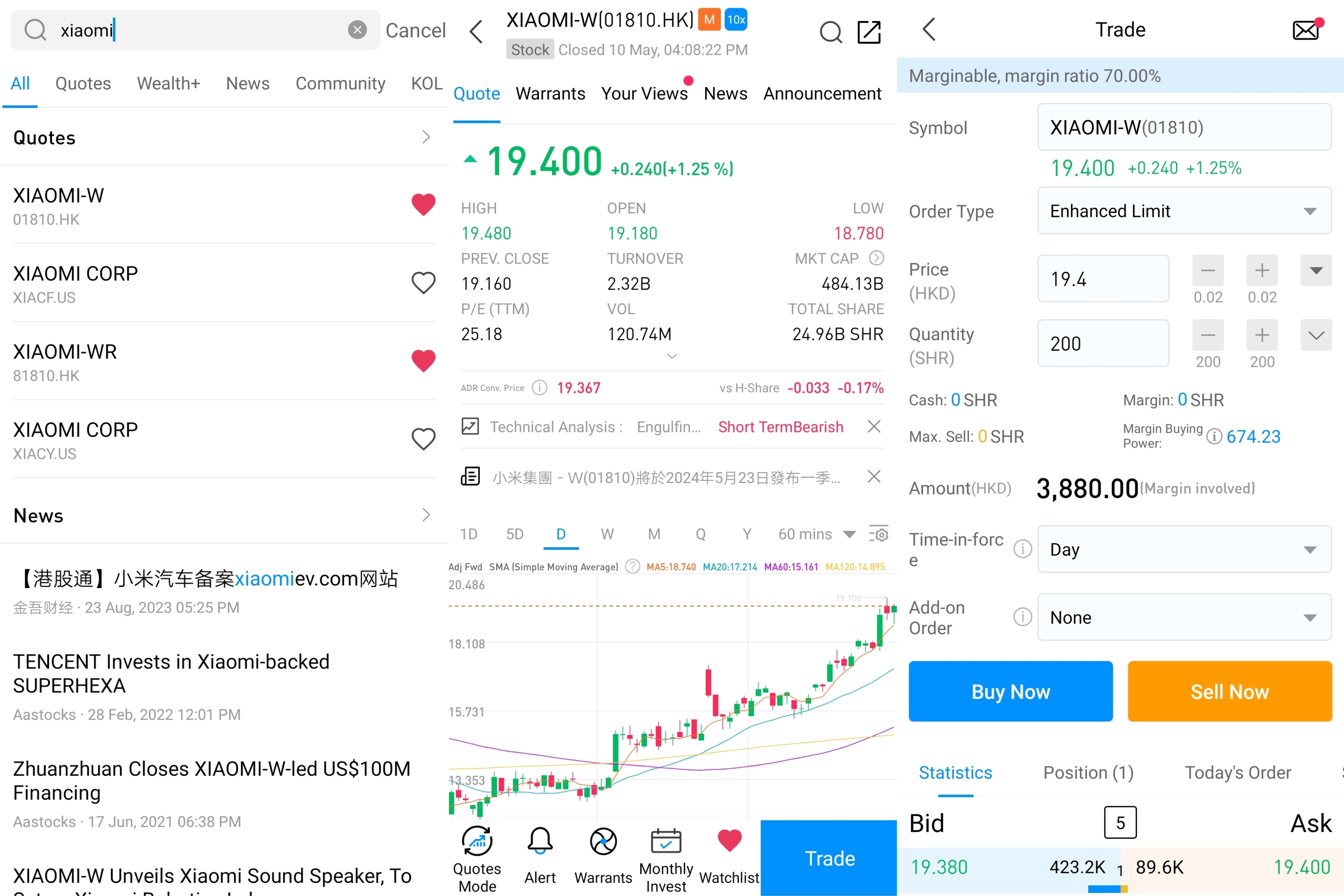 This diagram is provided for illustrative purposes exclusively
Source:uSMART


More Content