



How do users who have deposited funds submit transfer receipts and account verification documents?
After completing the bank app transfer, please upload supporting documents and submit an application following these steps so that your funds can be credited to your account as soon as possible:
Required Documents: Please prepare a screenshot of the successful transfer and proof of your bank account. (If you are unsure about the deposit voucher requirements, please refer to the following guide for deposit vouchers for verified transfer customers.)
To access the submission page: Open the uSMART APP → Click 【Open Account】 → Select 【Deposit Now】 in the bank transfer section. The subsequent APP path is: “Select the corresponding currency → Click 【Bank Transfer】 → Select your bank account for the transfer”
To access the submission page: Open the uSMART APP → Select the corresponding currency → Click 【Bank Transfer】 → Fill in and select your bank account for the transfer
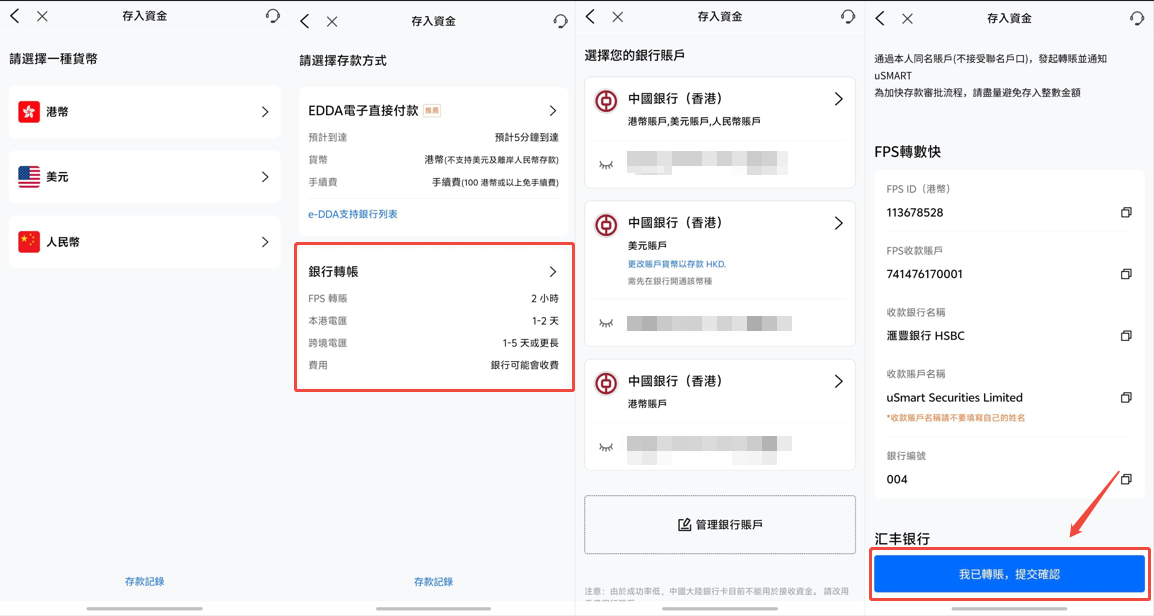
Fill in and upload: Click 【I have transferred, submit confirmation】, then select: the uSMART receiving account from which the funds were transferred, your remitting bank account, and enter the deposit amount; then upload the screenshot of the successful transfer and bank account proof you just prepared.
Confirm submission: Please carefully check the information you filled in and the content of the uploaded vouchers. Once you confirm that everything is correct, you can submit the deposit application.


